
GST / Compliance
GST Multistate Registration: One Master TRN for Registration in Many States
Reviewed by CA Neeraj Rohilla, FCA — Chartered Accountant, Startup Advisory, Saket, New Delhi.
What GSTN announced
The advisory, titled “Advisory on ‘Multistate Registration’ Facility for GST Registration”, was published on the GST portal’s News and Updates page on 1 October 2026. The operative paragraphs read:
The new tab sits on the portal home page next to the existing Register and Login options, and opens at reg.gst.gov.in/registration/msr. On the first screen, the “I am a” field is fixed to Taxpayer and cannot be changed, which is the portal’s way of enforcing the “Normal Taxpayers only” condition.
Why this matters: the old way
GST registration has always been State-wise. Section 22(1) of the CGST Act makes a supplier liable to register in the State or UT from which it makes taxable supplies once its aggregate turnover crosses the threshold, and Section 25(1) requires a separate application in every such State within 30 days of becoming liable. A Delhi garment exporter with a warehouse in Haryana and a showroom in Rajasthan needed three GSTINs, and until this week that meant three complete Form GST REG-01 applications, each started from scratch: Part A for the TRN, then Part B with the same company details, the same director KYC, the same authorised signatory, the same HSN list, typed in three times. Every re-entry was another chance for a mismatch between applications, and mismatches are exactly what draws a clarification notice in Form REG-03.
Simplifying registration for larger multi-State businesses was among the items press reports placed on the agenda of the 57th GST Council meeting. The Multistate Registration tab arrived on the portal before that meeting, as a GSTN functionality rather than a Council decision.
How the Multistate Registration flow works
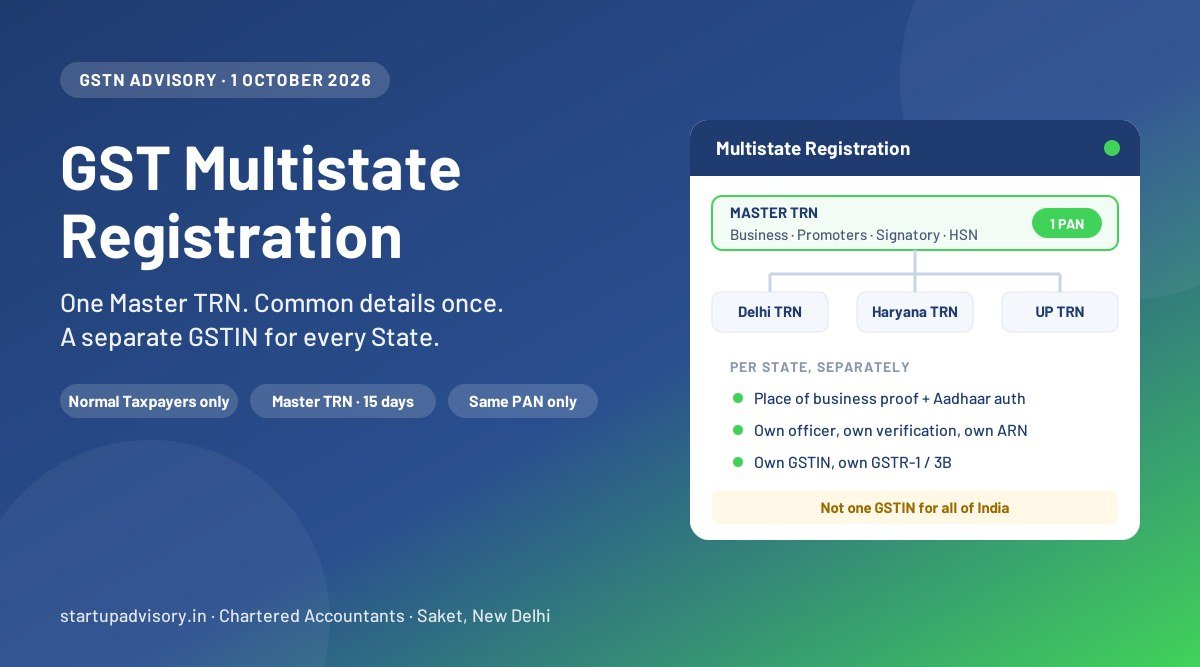
Read the flow as two layers: a master layer that collects everything common to the business, and a State layer that collects everything that depends on where the business sits.
- Open the Multistate Registration tab on the GST portal home page. The taxpayer type is pre-set to Normal Taxpayer.
- Select the States/UTs from the multi-select list, and enter the legal name of the business as per PAN (and MCA records for a company or LLP), the PAN, and the e-mail and mobile number for OTP verification.
- Verify the OTPs. The portal generates one Master TRN covering all the States you selected. Note it down. It must be submitted within 15 days.
- Log in with the Master TRN and fill the Common Registration Information (CRI): Business Details, Promoter/Partner details, Authorised Signatory, Authorised Representative, and Goods and Services (HSN/SAC). This is the part you now do once instead of once per State.
- Submit the CRI. The portal generates an individual TRN for each State/UT you selected. The CRI is auto-populated into each one and, per the advisory, remains editable there, so a different authorised signatory for a particular State, for example, can be set at this stage.
- Complete each State application under its own TRN: Principal Place of Business with address proof, Additional Places of Business, State-specific information, and Aadhaar authentication. Upload the State-specific documents, verify with DSC or EVC and submit. Each submission generates its own ARN.
- Each State’s tax officer processes its own application under Rule 9: approval within 7 working days, or up to 30 days with physical verification where Aadhaar authentication is not completed or the application is flagged. A query in one State does not hold up the others. On approval, each State issues its own GSTIN and Form REG-06.
What the facility does not do
This is the part most of the early coverage has blurred. The advisory changes the data entry; it changes nothing in the Act or the Rules.
- It is not a single GSTIN. Section 25(2) still gives one registration per State/UT, and each registration is a distinct person under Section 25(4). You still file a separate GSTR-1 and GSTR-3B for each GSTIN, keep a separate electronic credit ledger for each, and file a separate GSTR-9 (and GSTR-9C where applicable) for each.
- It is not a single approval. Three States means three officers, three verification tracks, and potentially three different outcomes. One State can approve in a week while another issues a REG-03 notice over the address proof.
- It does not pool input tax credit. Credit on a Haryana GSTIN cannot be used against Delhi output tax. Common input services still have to be distributed through an Input Service Distributor registration, which has been mandatory for that purpose since 1 April 2025, and supplies between your own GSTINs are still cross-charged under Schedule I.
- It does not skip Aadhaar or physical verification. The advisory expressly puts Aadhaar authentication in the State-specific layer. Where a State has rolled out biometric Aadhaar authentication under Rule 8(4A), the applicant may still be called to a GST Suvidha Kendra in that State.
- One registration per State per Master TRN. The portal screen states that although several States can be selected, only one registration can be applied for in a given State/UT under a Master TRN. A second registration in the same State for a separate place of business (Rule 11) still goes through the ordinary REG-01 route.
- Normal Taxpayers only, for now. Composition, casual taxable person, non-resident taxable person, TDS/TCS deductor, ISD, OIDAR and SEZ unit/developer applications are outside the facility as of the advisory. The word “currently” in the advisory suggests this may widen.
- It does not change when you must register. The 30-day clock under Section 25(1) runs State by State from the date you become liable in that State. The facility makes the paperwork faster; it is not a reason to delay a registration that is already due.
Who gains the most
- E-commerce sellers using multi-State warehousing (Amazon FBA, Flipkart, Myntra fulfilment centres). Every warehouse State needs a GSTIN, and sellers typically add three to six States in one go.
- Garment and merchandise exporters with job-work or finishing units across Delhi, Haryana, UP and Rajasthan.
- Franchise, QSR and retail chains opening in several States on the same calendar.
- Works contractors and project businesses that need a registration in every State where a site is located.
- Companies setting up branch offices across metros in one expansion round.
- Logistics and warehousing operators whose network is by definition multi-State.
If you are registering in one State only, nothing changes for you. Use the ordinary Register option, and see our GST registration guide for Delhi or the Gurgaon registration page.
Points to watch before you start
- Have address proof for every State ready before you generate the Master TRN. The 15-day clock on the Master TRN starts at generation. The State-specific layer needs a rent agreement or ownership proof, an NOC where applicable, and a recent electricity bill or property tax receipt for each Principal Place of Business. Missing proof in one State is the most common cause of a REG-03 notice.
- Be careful with virtual offices. Several States have cancelled registrations in bulk where a shared virtual-office address was the Principal Place of Business and physical verification found no business activity. Starting five State applications in one go does not make a weak address proof stronger in any of them.
- Decide the authorised signatory per State. Because the CRI stays editable in each State TRN, you can name a local manager as signatory for a particular State. Do it deliberately, with a board resolution or authorisation letter for each.
- Bank details within 30 days. Rule 10A still requires the bank account to be furnished for each new GSTIN within 30 days of registration or before the first GSTR-1/IFF, whichever is earlier, failing which the registration can be suspended.
- Simplified registration (Rule 14A) interaction is not stated. The advisory does not say whether the simplified, auto-approved registration route introduced from 1 November 2025 for low-risk applicants is available inside the multistate flow. If three-working-day approval under Rule 14A matters to you, confirm on the portal screen before choosing the multistate route.
- Keep the Master TRN and every State TRN and ARN on file. Portal correspondence, REG-03 notices and REG-04 replies are all tracked by ARN, State by State.
Documents to keep ready
| Layer | What is needed | Entered |
|---|---|---|
| Common (CRI) | PAN of the entity; certificate of incorporation or partnership deed/LLP agreement; PAN, Aadhaar, photo and address proof of each promoter/partner/director; authorised signatory details with proof of authorisation; authorised representative (GSTP) details if any; list of goods and services with HSN/SAC | Once, under the Master TRN |
| State-specific | Principal Place of Business proof in that State (ownership proof / rent agreement + NOC / consent letter, plus electricity bill or property tax receipt); Additional Places of Business in that State; State-specific registrations or professional tax details where asked; Aadhaar authentication of the signatory and promoters; bank account (within 30 days under Rule 10A) | In each State’s individual TRN |
What we recommend
- Use the facility if you need two or more new State registrations at the same time. The saving is real: one CRI instead of several, and fewer inconsistencies between applications.
- Do not use it to batch registrations that are not yet due. A registration taken before a place of business exists in that State invites a physical-verification failure.
- Prepare the State-specific proofs first, then generate the Master TRN. Fifteen days goes quickly when three landlords have to sign NOCs.
- Review the CRI line by line before submitting it. After submission, corrections are made State by State.
- Track each ARN separately and reply to each REG-03 within the 7 working days allowed. Different States ask different questions; answer the one in front of you.
- Plan the post-registration structure at the same time: ISD registration for common input services, cross-charge invoicing between GSTINs, e-way bill and e-invoice set-up for each GSTIN, and the return calendar (see our GST and TDS compliance calendar).
- GSTN, Advisory on “Multistate Registration” Facility for GST Registration, GST Portal News and Updates, 1 October 2026 (gst.gov.in/newsandupdates/read/674)
- GST Portal, Multistate Registration screen at reg.gst.gov.in/registration/msr (taxpayer type fixed to Normal Taxpayer; one registration per State/UT per Master TRN)
- Sections 22, 25 and Schedule I, Central Goods and Services Tax Act, 2017
- Rules 8, 9, 10A, 11 and 14A, Central Goods and Services Tax Rules, 2017
- Section 20, CGST Act (as amended by the Finance Act, 2024): mandatory ISD for distribution of credit on common input services, effective 1 April 2025
No CBIC notification or circular accompanies the advisory as of 2 October 2026. The facility is a portal functionality; the statutory position on registration is unchanged. We will update this article if GSTN issues an FAQ or user manual.
This article is general information, not tax advice. It is based on GSTN’s advisory of 1 October 2026 and the portal screens as they stood on that date; the portal flow may change. Confirm your own position with a qualified professional before relying on it.
How Startup Advisory Can Help
Startup Advisory is a CA-led firm in Saket, New Delhi. We register and run multi-State GST set-ups for exporters, e-commerce sellers and growing companies across Delhi NCR and beyond:
- Multistate Registration filed end to end: CRI prepared and checked once, State-specific proofs collected before the Master TRN is generated, every ARN tracked and every REG-03 answered.
- Address-proof review for each State, including the virtual-office risk, before the application goes in.
- Post-registration structure: ISD registration, cross-charge invoicing, e-invoice and e-way bill set-up for each GSTIN.
- Monthly GSTR-1, GSTR-3B and 2B reconciliation for all your GSTINs under one retainer.
Call 9311972982 or book a free consultation.